Source NAT
Skills to be Learned
- Abusing networks namespaces for fun and profit
- Configuring snat address
- Configuring snat inside and outside interfaces
FD.io VPP command learned in this exercise
Topology
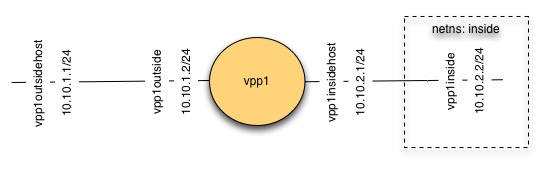
SNAT Topology
Initial state
Unlike previous exercises, for this one you want to start tabula rasa.
Note: You will lose all your existing config in your FD.io VPP instances!
To clear existing config from previous exercises run:
ps -ef | grep vpp | awk '{print $2}'| xargs sudo kill
$ sudo ip link del dev vpp1host
$ sudo ip link del dev vpp1vpp2
Install vpp-plugins
Snat is supported by a plugin, so vpp-plugins need to be installed
$ sudo apt-get install vpp-plugins
Create FD.io VPP instance
Create one FD.io VPP instance named vpp1.
Confirm snat plugin is present:
vpp# show plugins
Plugin path is: /usr/lib/vpp_plugins
Plugins loaded:
 1.ioam_plugin.so
 2.ila_plugin.so
 3.acl_plugin.so
 4.flowperpkt_plugin.so
 5.snat_plugin.so
 6.libsixrd_plugin.so
 7.lb_plugin.so
Create veth interfaces
- Create a veth interface with one end named vpp1outside and the other named vpp1outsidehost
- Assign IP address 10.10.1.1/24 to vpp1outsidehost
- Create a veth interface with one end named vpp1inside and the other named vpp1insidehost
- Assign IP address 10.10.2.1/24 to vpp1outsidehost
Because we’d like to be able to route *via* our vpp instance to an interface on the same host, we are going to put vpp1insidehost into a network namespace
Create a new network namespace ‘inside’
$ sudo ip netns add inside
Move interface vpp1inside into the ‘inside’ namespace:
$ sudo ip link set dev vpp1insidehost up netns inside
Assign an ip address to vpp1insidehost
$ sudo ip netns exec inside ip addr add 10.10.2.1/24 dev vpp1insidehost
Create a route inside the netns:
$ sudo ip netns exec inside ip route add 10.10.1.0/24 via 10.10.2.2
Configure vpp outside interface
- Create a vpp host interface connected to vpp1outside
- Assign ip address 10.10.1.2/24
- Create a vpp host interface connected to vpp1inside
- Assign ip address 10.10.2.2/24
Configure snat
Configure snat to use the address of host-vpp1outside
vpp# snat add interface address host-vpp1outside
Configure snat inside and outside interfaces
vpp# set interface snat in host-vpp1inside out host-vpp1outside
Prepare to Observe Snat
Observing snat in this configuration is interesting. To do so, vagrant ssh a second time into your VM and run:
$ sudo tcpdump -s 0 -i vpp1outsidehost
Also enable tracing on vpp1
Ping via snat
$ sudo ip netns exec inside ping -c 1 10.10.1.1
Confirm snat
Examine the tcpdump output and vpp1 trace to confirm snat occurred.