Creating an Interface
Skills to be Learned
- Create a veth interface in Linux host
- Assign an IP address to one end of the veth interface in the Linux host
- Create a vpp host-interface that connected to one end of a veth interface via AF_PACKET
- Add an ip address to a vpp interface
VPP commands learned in this exercise
Topology
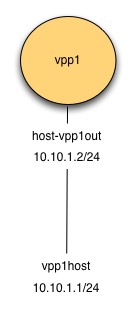
Figure: Create Interface Topology
Initial State
The initial state here is presumed to be the final state from the exercise VPP Basics
Create veth interfaces on host
In Linux, there is a type of interface call ‘veth’. Think of a ‘veth’ interface as being an interface that has two ends to it (rather than one).
Create a veth interface with one end named vpp1out and the other named vpp1host
$ sudo ip link add name vpp1out type veth peer name vpp1host
Turn up both ends:
$ sudo ip link set dev vpp1out up
$ sudo ip link set dev vpp1host up
Assign an IP address
$ sudo ip addr add 10.10.1.1/24 dev vpp1host
Display the result:
$ ip addr show vpp1host
5: vpp1host@vpp1out: <BROADCAST,MULTICAST,UP,LOWER_UP> mtu 1500 qdisc noqueue state UP group default qlen 1000
  link/ether e2:0f:1e:59:ec:f7 brd ff:ff:ff:ff:ff:ff
  inet 10.10.1.1/24 scope global vpp1host
     valid_lft forever preferred_lft forever
  inet6 fe80::e00f:1eff:fe59:ecf7/64 scope link
     valid_lft forever preferred_lft forever
Create vpp host-interface
Make sure VPP is running, if not start it.
$ ps -eaf | grep vpp
vagrant   2141   903  0 05:28 pts/0    00:00:00 grep --color=auto vpp
# vpp is not running, so start it
$ sudo /usr/bin/vpp -c startup1.conf
These commands are run from the vpp shell. Enter the VPP shell with the following command:
$ sudo vppctl -s /run/vpp/cli-vpp1.sock
    _______    _        _   _____  ___
 __/ __/ _ \  (_)__    | | / / _ \/ _ \
 _/ _// // / / / _ \   | |/ / ___/ ___/
 /_/ /____(_)_/\___/   |___/_/  /_/

vpp#
Create a host interface attached to vpp1out.
vpp# create host-interface name vpp1out
host-vpp1out
Confirm the interface:
vpp# show hardware
              Name                Idx   Link  Hardware
host-vpp1out                       1     up   host-vpp1out
Ethernet address 02:fe:d9:75:d5:b4
Linux PACKET socket interface
local0                             0    down  local0
local
Turn up the interface:
vpp# set int state host-vpp1out up
Confirm the interface is up:
vpp# show int
              Name               Idx    State  MTU (L3/IP4/IP6/MPLS)     Counter          Count
host-vpp1out                      1      up          9000/0/0/0
local0                            0     down          0/0/0/0
Assign ip address 10.10.1.2/24
vpp# set int ip address host-vpp1out 10.10.1.2/24
Confirm the ip address is assigned:
vpp# show int addr
host-vpp1out (up):
  L3 10.10.1.2/24
local0 (dn):